Fixing Mount Corruption on TeslaUSB

I use TeslaUSB (via a Raspberry Pi Zero W) to record my Tesla Dashcam footage, and automatically upload it to my NAS when I return home. Recently, however, my pi failed to boot up properly, and my dashcam was unable to record footage.

When I plugged it directly into a monitor at home (it wouldn’t even start enough to SSH into the pi), I was able to see an error on the startup logs complaining about corruption when mounting /backingfiles.

The below is a how-to, for anyone else encountering this issue, to repair the device without resorting to a full reinstall. Please note that whilst this worked for me, I make no guarantees that it will for you. You may need to resort to a full reinstall if it all goes pear shaped.

Sorry, I was exploring and attempting to fix the issue, so no screenshots/photos.

What You’ll Need

  • A monitor, and a micro-HDMI cable to connect to your pi
    • A Keyboard you can plug in
    • An SD Card reader
    • A computer

NB: This guide assumes you are using Windows on your computer. Additional steps/different locations may be required if you are using Mac/Linux

Verify the issue

First, plug your pi into your monitor, and power it up. You’ll see a bunch of log entries. If you’re encountering the same issue as I did, you’ll see an error log indicating that there was an error mounting /backingfiles – In my example the error said something about corruption on the mount.

You will also likely see an error at the bottom stating Can Not Open Access to Console the Root Account is Locked. This is because we do not set a password on the root user in linux by default (instead we use the sudo command to elevate permissions).

If you do not see the account locked error, you may be able to bypass the first few steps of the fix.

Initial Setup

The below steps indicate what I did to fix the issue.

  1. Plug your SD card into your computer
  2. You should see the drive displayed in File Explorer
  3. Open the drive, and edit cmdline.txt
  4. At the very end of the line, add init=/usr/bin/bash (leaving a space after the existing text, and save the file
    • Ensure that the full content of the file is on a single line
  5. Reinsert the SD card into the pi and boot it back up

At this point, you won’t see the error, but the pi will load into a default bash session. Here, we need to set the root password using pwd. It will ask you to set and confirm a password.

Don’t worry about the password being too secure, we’ll remove it as part of our cleanup at the end.

  1. Plug your SD card back into your computer
  2. Navigate back to cmdline.txt
  3. Remove the init=/usr/bin/bash and save the file
  4. Reinsert back into the pi and boot it again

At this point, you’ll encounter the error again, but now you’ll have a working root session.

Fixing the Issue

From here, we can actually investigate the issue, and make attempts to resolve it.

Start by entering systemctl status backingfiles.mount – You should see an error in here relating to the issue we saw in the startup logs. Make a note of the What section of the output.

Back at the command prompt, type in xfs_repair -v -L [path] – substituting [path] with the path specified in the What section beforehand.

This will take a few minutes to complete, just let it do its thing.

Once it is complete, you can restart the pi (I had to pull the plug, as the regular shutdown command didn’t seem to work). You should now see the TeslaUSB load properly, and drop you into a login prompt. If you do, the issue should be fixed!

Cleanup

Now we have it working, we need to clean up that root password. Log into the pi using your teslausb login credentials.

  1. Type in sudo -i and press enter
  2. Type in bin/remountfs_rw and press enter – this allows us to make changes as necessary
  3. Type in passwd -dl root and press enter

This will remove the root password we added earlier, and return it back to the intended state.

Conclusion

And that’s it! We now have a working TeslaUSB drive again, and can plug it back into the car.

We need to talk about eNPS

Employee Net Promoter Score (eNPS). It’s a prevalent metric on all employee satisfaction surveys these days. But what if the number is leading us astray?

eNPS Origins

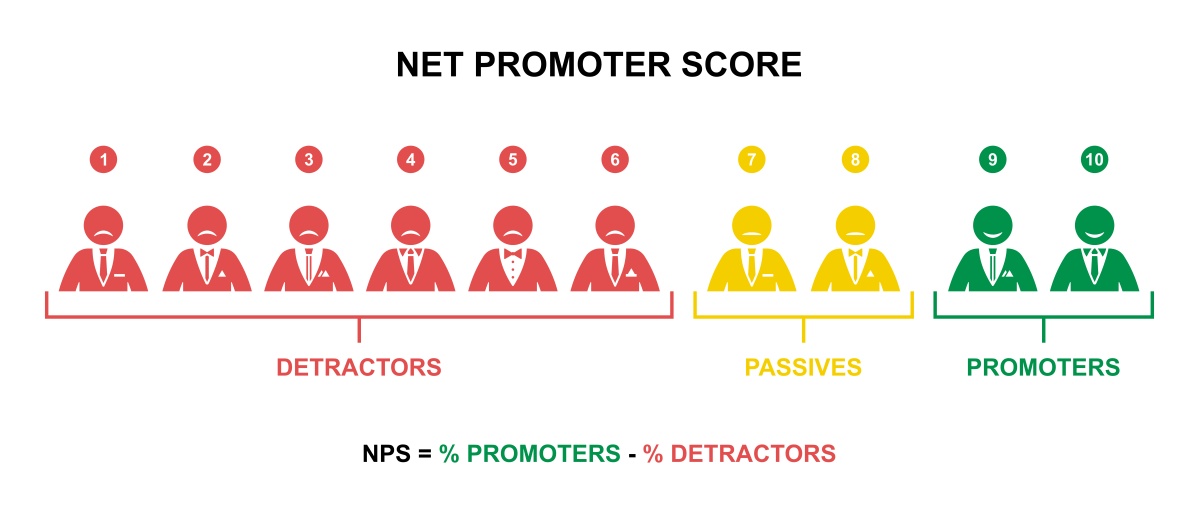
In 2003 Frederick F. Reichheld proposed a system of understanding the customer happiness with a business, by asking the question: “How likely is it that you would recommend [company X] to a friend or colleague?” with a scoring between 1 (not likely) and 10 (highly likely).

NPS is calculated by subtracting the percentage of detractors (those scoring 1-6) from the percentage of promoters (respondents scoring 9-10). If the number is positive, your public image is generally positive. If it’s below zero, it’s more negative.

Employee NPS (eNPS) is an extension of this system, used as part of company satisfaction surveys to gauge overall satisfaction with the employer. The reasoning is: Employees that are likely to recommend the company are happy employees, and those who would not, are unhappy.

Thus, eNPS boils employee sentiment down to a single number, that Senior Management can use to gauge overall satisfaction levels (often broken down by department).

Why Do We Love eNPS So Much?

For me, there’s a few reasons that it’s become so prevalent:

  • It’s simple: We can look at a simple number to determine overall satisfaction without trawling through screeds of data.
  • It makes it easy to view change over time.
  • It’s an “Industry Standard” metric, making it easier to compare ourselves to our competitors.

The Big Problem with eNPS

eNPS tells a narrow story (poorly in my view), and is often misinterpreted as saying more than it actually does.

One Story, Poorly Told

NPS is designed to tell you one simple thing: Overall, do you have more people praising your company to the world, or more people complaining about it? It’s a measure of your public perception.

This is a powerful metric when you are providing a service or selling a product. A more positive public image means more sales.

In the context of an employee satisfaction survey though, that’s not the story we are looking to gain insight into. We’re looking to find out who is happy working for us, and where we have problems within the organisation. That’s not the same thing as who is talking peoples ear off at parties about us.  

In short: we’re conflating two separate questions. Recommendation is not the same thing as satisfaction. Not when it comes to who is employing you.

Many employees would recommend their employer to a friend in need of a job. But that doesn’t preclude them being unhappy (or having issues that need to be addressed). Likewise, some employees are unlikely to ever recommend their employer, no matter how happy they are with the company.

It Ignores the “Passives”

By design, NPS ignores anyone who scores a 7 or 8. In a world where you are concerned about public image from customers, this makes sense. People are more likely to shout about your company if they are exceptionally pleased, or exceptionally unhappy. People who score a 7 or an 8 are generally happy with the product, but less likely to be making any noise about it online.

But when it comes to employee satisfaction, 7s and 8s are important scores. In many ways, I believe these scores are the most important scores in the whole question. These employees are generally happy with their employer, but may have some simple issues, that would provide a significant impact to overall satisfaction when solved.

Additionally, ignoring these scores is going to skew your results (most likely towards the negative range).

The Competition Doesn’t Matter

I mentioned before that eNPS being an industry standard question, means we can compare ourselves to our competitors. But the issue here for me is that it doesn’t matter what the other companies are scoring compared to us.

Potential employees are unlikely to be looking at your eNPS metric (if you even publish it). Instead, they’re weighing your offer of employment against several factors (Salary, Benefits, Tech Stack, etc). Any one of those factors could be enough to put you out of the running.

When it comes to current employees, they’re also not jumping ship because the other company scored a higher eNPS. If they’re looking to move, it’s because they have issues with our company, or the other company has a much more attractive package for their circumstances.

When it comes to employee satisfaction, comparing ourselves to competitors could make us rest on our laurels. “We’re better than Contoso, so we don’t need to work as hard to keep our employees”.

The fact is, we shouldn’t be comparing ourselves to other companies. We should be comparing ourselves to our past selves. How do we make ourselves a better employer than we were last year? It’s this focus that will ultimately make us an attractive employer, that inspires loyalty and attracts the top talent.

How Should We Measure Employee Satisfaction?

Well, there’s two possible aspects to that: Fix the issue; or ignore the question.

Fix the Issue

If we still want to have a single metric, we should change a few things:

  • Change the wording of the question: Ask the question we’re really interested in, rather than beating about the bush. E.g. “Overall, how satisfied are you with [company] as an employer?”
  • Scrutinise the entire range of answers: Knowing how many people gave what score is illuminating. But crucially, don’t ignore any particular subsection of the scores
  • Score based on overall percentage: If you still need to boil it down to a single numeric score, pick a  “generally satisfied” cut-off (I’d suggest 7+ here). Then calculate the percentage of respondents who are at or above that cut-off.

Ignore the Question

This is, personally, my preferred approach, and one I generally take when reviewing satisfaction survey results. Whilst I do look at the results from eNPS, I’m more interested in the breakdown of scores than the overall calculation.

However, I’m much more interested in all the other questions we ask.

When we do satisfaction surveys, the eNPS question is only one of many. The survey usually has lots of questions around the employee’s sentiment around the management, leadership, work, expectations, etc. These questions are (in my opinion) much more interesting and valuable.

You almost certainly also have free-text comments boxes you can scrutinise for patterns of complaints. These fields provide incredibly valuable insights. Employees who are invested (and feel safe) enough to fill the free-text fields out will provide a wealth of intelligence on areas where you could look at improving matters to increase satisfaction.

It is very rare to have a department that is perfectly happy and have no areas for improvement. Regardless of the eNPS score, every department leadership should be trawling their results on each of these questions for insights in how to improve their area.

Finally, don’t wait until a once-a-year satisfaction survey. All your managers should be having regular 1:1s with their reports. Higher-level managers will ideally be regularly arranging skip-level 1:1s with their indirect reports. These should be safe spaces where your employees feel able to raise concerns and issues. Use those to gauge satisfaction and spot issues early. Encourage your managers to bubble potential concerns up from these meetings for greater visibility.

Summary

In my view, extending NPS as a metric for employee satisfaction is flawed. It conflates two separate questions, and assumes that because the metric is transferable for customers, it must be so for employees. This is not the case. Employee satisfaction is multi-faceted, and we are better served when we bear that in mind.

So please, next time you’re looking over your departments satisfaction survey results, look beyond the eNPS score, and see the real story of your teams satisfaction.

What are your thoughts around eNPS? Do you have a different viewpoint I have not considered? Do you favour a different method of gauging satisfaction?

Asuswrt-Merlin Cloudflare DDNS

Step by Step instructions for setting up Cloudflare Dynamic DNS with an Asuswrt-merlin router

Recently, I’ve wanted to be able to VPN into my home network so that I can perform various tasks while out of the house. My provider does not offer static IP addresses to residential customers, so I have to rely on a Dynamic DNS service. I don’t want to have my personal IP publicly listed on my domain, however, so I’d like to use Cloudflare to proxy the IP.

Asuswrt-merlin (developed by Eric Sauvageau – well worth a look if you are currently running the stock asuswrt firmware) provides the ability to link the router up to a Dynamic DNS service (DDNS).

However, it does not natively support Cloudflare as a DDNS. In fact, Cloudfare doesn’t appear to have a dedicated DDNS system (certainly not on the free tier). But, with some clever trickery (produced by others), its possible to set it up to update DNS records in cloudfare.

None of this is my handiwork, but for posterity, I want to document the full process to set it up here.

Continue reading “Asuswrt-Merlin Cloudflare DDNS”

ExpressVPN and NordVPN on AsusWRT-Merlin

Setting up ExpressVPN and NordVPN on Asuswrt-Merlin requires a few manual steps.

I’ve been meaning to use VPN on all my traffic for a while to be honest, especially since the UK Government attempted to force ISPs to log your traffic. But the BT hub doesn’t support doing it at the router level, and I didn’t want the hassle of doing it on each device.

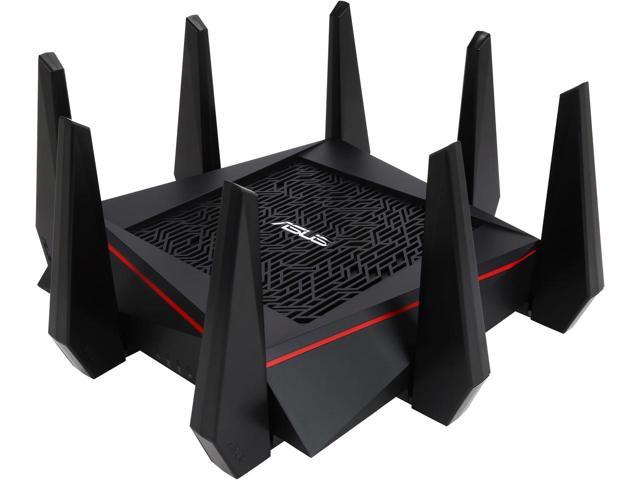
Recently, the hub has started acting up, and the WiFi keeps dropping out. So I purchased the beast pictured above, the Asus RT-AC5300. One of the benefits it affords, is the ability to create router-level VPNs.

To add a wrinkle to the issue, as I work from home, my work laptop has device-level vpn that I use to connect to our work resources. For performance reasons, I want to ensure that this vpn traffic does not go over the routers VPN: There’s no point taking the performance hit of double-vpning for no good reason. The stock AsusWRT firmware doesn’t allow this level of configuration, but the custom Asuswrt-Merlin does.

Of course, not going the path of least resistance always has its issues. And this time was no different. Attempting to set up the router with NordVPN or ExpressVPN via their openVPN setting files just caused my entire network to die.

After an hour with one of ExpressVPNs techs finally netted me the solution: Turns out the .ovpn files don’t set everything as required. The steps below detail how to set up OpenVPN on Merlin firmware for ExpressVPN and NordVPN to make them work.


Basic OpenVPN Setup

  1. Log into your Router admin page (via router.asus.com, or the default gateway IP – usually 192.168.1.1 by default).
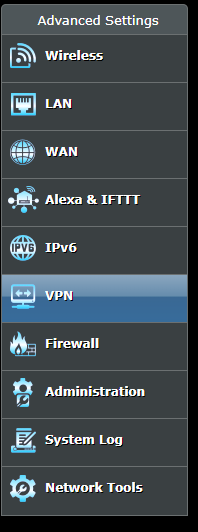
  2. Select the VPN section

Asuswrt-Merlin VPN Section

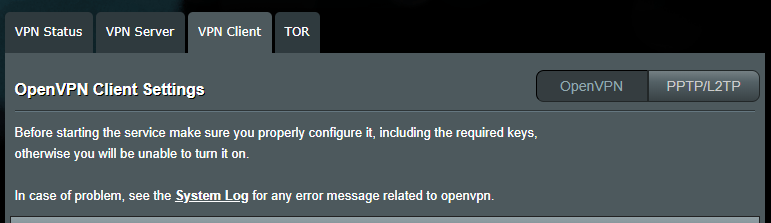
  1. Select the VPN Client tab

Asuswrt-Merlin VPN Client

  1. Select an unused Client Instance from the dropdown. Be sure to use 1, 3 or 5 for best performance
  2. Select the .ovpn file you wish to use, and click upload

Asuswrt-Merlin VPN upload

  1. Set the desired name

Asuswrt-Merlin VPN Description

  1. Set the Accept DNS Configuration to either Strict or Exclusive. Use Strict if all your traffic will go via the VPN, or Exclusive if you intend to exclude certain devices/traffic

Asuswrt-Merlin VPN DNS

So far, so good. This is fairly standard. The .ovpn file will set most of the settings as required, but there’s a few things we still need to do in order for the VPN to work.


NordVPN

NordVPN actually have an excellent write-up for setting up OpenVPN on Asuswrt-Merlin. It covers all the steps already listed and one additional. For completeness, I’ll detail that step below.

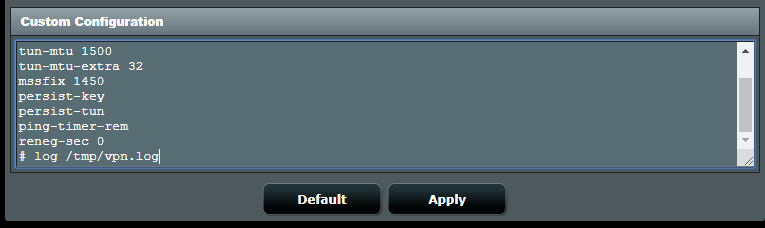
  1. Enter the following into the Custom Configuration setting box
remote-cert-tls server
remote-random
nobind
tun-mtu 1500
tun-mtu-extra 32
mssfix 1450
persist-key
persist-tun
ping-timer-rem
reneg-sec 0
# log /tmp/vpn.log

Asuswrt-Merlin VPN Custom Configuration


ExpressVPN

ExpressVPN requires just one additional step to set it all up:

      1. Set Compression to LZO Adaptive

Asuswrt-Merlin VPN Compression


Final Steps

With all the above steps completed, hit Apply, and then set the Service State switch to On.

Asuswrt-Merlin VPN Service State

You should find that the VPN comes up, and your internet browsing works as intended. If you want to make sure that your traffic is using the VPN, you can use the following sites:

      • ExpressVPN
      • NordVPN – The banner at the top tells you your NordVPN protection status.

Policy Based Routing

If, like me, you want to route only certain traffic through the VPN, you will want to set up Policy-Based routing.

Pokémon Go: Gotta Crash Em All

As I mentioned before, I’m fairly new to Pokémon, having managed to avoid it all my life so far. I thought the new Pokémon Go app would be no different.

So how is it, that I spent this last weekend getting angry at the server outages?

There’s a lot to like about the new Pokémon Go app by Niantic. But there’s also a lot to hate.

Of course, as with any new game, there are always issues/snags/areas for improvement. Below are my thoughts so far on these issues.

Server Reliability

Over the last weekend (Opening Weekend in the UK), the servers have been absolutely atrocious. In conflicting reports, it is either down to just the sheer volume of people attempting to play; or the efforts of a DDoS attack by the PoodleCorp hacking group. In either case, the game has been borderline unplayable most of the weekend.

Further contributing to this, is the apparent continued rollout by Niantic to additional countries over the weekend. This just adds to the pressure on the servers. Instead, they should have halted the rollout (and perhaps even have gone so far as to shut it down in certain countries) whilst they got the server issues under control.

Personally, I would prefer a state where I was told I couldn’t play at all this weekend, to one where I might (maybe, possibly) get in to play for a little bit before it crashes. If nothing else, I can plan my weekend around that fact.

Bugs/Crashes

Perhaps fueled by the reliability, or an issue in its own right, there have been numerous bugs reported by almost everyone.

These range from the (relatively) innocuous issue with the “Nearby” tab footprints staying at 3 no matter how close you are, to issues where the game freezes whilst capturing a Pokémon (I’ve lost count of the number of times that it’s done this to me).

Data Allowance/Coverage

My other half has only a small data allowance on her phone (1-2GB). She’s used 80% of that already since the 5th of this month! Whilst not necessarily all related to Go, thats a staggering amount. I’ve heard (unsubstantiated) reports that this might perhaps be downloading information from the server constantly that could perhaps be cached on the device for lower usage.

This is also one of those games that requires a constant connection to the servers, so there’s no chance of playing this if you have no coverage in a given area. Poor coverage is also likely to kill your enjoyment.

Battery Usage

Go is a phone killer. There’s no two ways about this. In order to play the game, you need the app to be constantly open and running (you can’t even lock your screen). This thing is constantly talking to the server, and checking your GPS. The screen is also permanently on when this is happening. If you plan to play, expect to require at least one portable battery charger, or you are going to find it hard to do much after a while.

The game does have a “Battery Saver” mode. When turned on (it’s off by default), this will dim the screen when the phone is turned upside-down. The screen is still on, and its still doing its thing, but it helps to save the power a little.

Locking

As mentioned above, you cannot lock the screen whilst you are playing this game. If you want to get notifications of nearby Pokémon, you are going to need to leave the phone unlocked. This is a bit of a security issue. If I keep it unlocked in my pocket, then it’s ripe for being pick-pocketed. Not to mention the increased chance of “butt dialling”.

The Social Aspect

The social aspect has a negative side too. The news is filled with stories of people being robbed, shot at, etc. As always, you should exercise caution and good judgement about where you go and with whom. If your kids are playing this, make sure they are capable of making these calls – or even just get involved and go out with them.

Battles

For catching wild Pokémon, the battle system is, frankly, pretty dull. It’s also nothing like the other games. To catch one, you just keep throwing Pokéballs at it until you finally capture it.

Equally, gym battles are real-time, frantic tap-a-thons. These are nothing like the original games.

Finally, there are no player-player battles (yet).

Lack of Gyms/Stops

The Lack of Nodes in rural areas is depressing
Emptiness, as far as the eye can see

In rural areas, the game is near pointless. Even ignoring the coverage issues, there are very few stops or gyms around in these places. At my work, there are three or four stops on my lunchtime walk, and one or two gyms.

In contrast, in the park at the end of my road at home, there are no less than 3 gyms, and around 10-15 Pokéstops.

I get that rural areas will generally be a bit less populated, but they really need to up their game a bit here.

What Niantic needs to do

In my opinion, there’s a good game here, under the issues. But there’s still a fair amount of work Niantic should be doing to get it up to scratch:

  • Get a handle on the server load issues.
  • Fix bugs (obviously)
  • Optimise the battery performance
  • Optimise server communications
  • Implement P2P battles
  • Modify all battles to a more turn-based affair
  • Allow phones to be locked whilst still receiving notifications for Pokémon/Stops
  • Add many more stops/gyms.


Read: Pokémon Go: Gotta Catch Em All For my thoughts on the good things about the new Pokémon Go App.


Pokémon Go: Gotta Catch Em All

At 33 years old, I’ve managed to “miss” the pokemon craze at virtually every step. I once downloaded it for the DS (don’t ask what edition), but didn’t really play it for long. I just found it repetitive and dull, I couldn’t get it to captivate me for long.

That apparently has now come to an end. This last weekend, We’ve been largely obsessed with getting out and finding new Pokemon to catch.

Pokémon Go is the new app by Niantic, released in partnership with Nintendo. Niantic previously made Ingress – a very similar game to Go (In fact, many of the stops/gyms found in Go are also found in Ingress).

At it’s heart, its a basic Pokémon game: You travel around the world capturing Pokémon that you find in the world. Except, in this game, “you” is the physical you, and “the world” is the real world. Thats right, you actually need to get off the sofa for this one.

Below, I detail the things I like about the new app (so far).

Multiplayer

There’s a “Capture the Flag” component, which sees you attempting to claim and defend gyms for your team. This is cleverly designed in a way that, even if you can’t defeat all the Pokémon in the gym, you can at least chip away at the level and help others bring it down.

Physical Exercise

Go also cleverly makes use of the real world, placing Pokémon around the real world, requiring you to get out and about. This is sneakily encouraging kids (and even 30-somethings…) to get out and be more active. Each area has a particular collection of Pokémon that are native – so you are often going to have to go out to different areas to find new types.

The Social Aspect

Whilst (currently) there isn’t much social aspect in the game itself, it’s encouraging all manner of social interactions that may not have been present in other games. For a start, it’s fairly easy to spot other players, and the shared nod and smile that typically follow is great. In the last weekend, I’ve engaged in conversation with no less than 4 different groups of people I’ve never laid eyes on before.

There are countless Facebook groups springing up for the game, and events organised by these groups. On Sunday (sadly cancelled), my local group had arranged a “Red vs Blue: The Battle of Union St” event. I would expect these to appear more often as popularity builds.

There are also many stories of families becoming more involved in group activities: Planning days out, etc. It definitely seems to be bringing people together more.

Additionally, you can use “lures” at specific stops that benefit everyone in the area. When one of these is dropped (you get some for free every so often, but you can buy them too), you will often see several groups of people congregate in the area. This further encourages conversation.

The IoT Dilemna

A discussion of what I think it will take for IoT to really take off.

As a tech person, I should be all over IoT, yet I’m not. Whenever I look at the options, I can admit that they are cool, but I struggle to find the use case.

Here are my main issues with IoT today:

No Real Standard

There are many different IoT devices out there. Some of them play nice together, many of them don’t.

In my opinion, for IoT to really take off, there needs to be a unifying standard. Much like SmartWatches, IoT devices should not be dictating the system I have to use. I should be able to choose the system I want (e.g. Smart Things or HomeKit), and devices should just fit into that.

Manufacturers need to agree on some standards, and not expect consumers to have to live with many different systems. In the end, IoT really needs to become a lot like Bluetooth.

One App To Rule them All

Related to the above, I don’t want to have to use a different app for each of my IoT systems: I want to just be able to have one app to control them all.

Not only does this make things easy to manage, but it allows much more complex setup. You can have all your IoT devices linked together in complex and seemingly magical ways.

There are inroads being made here, of course. Smart Things aims to tie several disparate systems together, and allow control and programming from a single app. It even ties in with the likes of Amazon Echo to enable voice control.

Similarly, HomeKit from apple is attempting to tie these systems together to allow voice control via Siri. You still need the app for each system, though. And if you want to do it manually, then you have to work in each app itself. There are rumours that apple is working on an app in iOS 10 that will allow these things to tie together – but it’s going to need to stop me needing to install those other apps in the first place. I only want to install one app, and have it control them all.

Current Functionality First

IoT needs, first and foremost, to not get in the way of everyday life. Take smartbulbs for example.

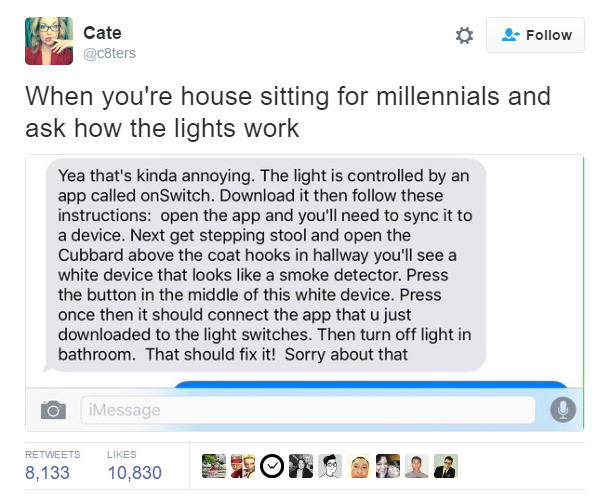
With a smartbulb, you need to ensure that the power is permanently on to the bulb, in order to control it via an app. This is all well and good, but becomes a nightmare when Someone is visiting.

iotMillennials

Some bulbs (such as Lifx) apparently will automatically switch on like a normal bulb if you power-cycle them.

But even that is a minor pain. Now, to use my bulb without the app, I need to turn the light off and back on again.

How do you explain to your Granny that whenever she comes into the house she needs an app to unlock the door, turn on the lights, etc? Do you want to try to explain what an app is? How to pair it with your house? Or that she has to just flick the lights on and off a couple of times (but not too often, or you will reset the system!)

IoT needs to adopt an approach where they aim to deliver current functionality seamlessly, and provide a magical world of enhancement on top of that for those users.

Easily Reversible

A lot of IoT already does this, to be fair, but in most cases IoT needs to be easily reversible. Many people around the world rent their properties. They need to be able to install and use their IoT devices in a manner that allows easy reversal once they move out. Requiring rewiring, or holes in the plasterboard are out.

Solve Genuine Needs

Again, this can be hit and miss on some current devices. Do I really need a toaster that will send me a notification when it starts to burn? Probably not.

Secure and Reliable

Smart locks seem like a cool idea: When you come home, your door will unlock automatically. You can let someone in remotely, or provide schedules that they are permitted to unlock the door. You can even get notifications when that troublesome teen tries to sneak in at 03:00.

But can you trust an internet connected device to secure your home? Can you trust that it’s actually locked? What if there’s a glitch?

To “hack” a mechanical lock requires skills at lockpicking (or at least an Enforcer) to get in. With IoT locks, it only takes one person to find the magic touch, and it can be in the handle of thousands of Script Kiddies within hours. Is it likely? Maybe not. But do you want to take that chance?

Other IoT devices are the same. You need to be sure that whilst you can access your devices (locally and remotely) with ease, other people cannot.

Conclusion

It’s hard for me to find the use case for IoT in life at the moment. But that doesn’t mean I’m going to stop trying. A colleague is going to lend me some Lifx bulbs, so I’ll spend some time trying those out, and see if I can fall in love with them.

The Perfect Fitness Tracker?

Is there such a thing as my perfect fitness tracker?

Last April, I bought the other half a new Fitbit Charge HR for her birthday. She loved it, and I began to love the idea of a fitness tracker.

Not one to be tied down too soon, I installed several tracker apps on my phone. Because I couldn’t decide between the two main contenders (Fitbit and Up), I installed both, and gave them access to my motion tracker, etc. The goal, was to use them until I had decided, then I’d switch over – I could try before I buy and, because I was running both simultaneously, I wouldn’t lose my data.

Over a year on, I still haven’t committed to a tracker.

So what’s wrong? Why haven’t I picked a tracker yet? Simply put, I’ve yet to find a tracker I’m completely wowed by, and none of the current offerings have ticked enough of my boxes to make me take the plunge.

Below are my thoughts on the two main contenders: Jawbone and Fitbit

Looks

First off, if I have to wear this thing day in, day out, I need it to look decent. I don’t really want to stop wearing my regular watch (it was a gift from the other half), so it needs to sit on my off-hand and look at least a little stylish.

Most importantly, it can’t look like a watch.It would look pretty daft to be walking around with a watch on both arms all day. I don’t mind it having a screen though.

Fitbit: Fitbit have a range of devices to suit most situations. Of the current market, the Charge is a bit too rubbery for my tastes. The Alta is a potential winner here.

Jawbone: Jawbones latest offerings, the Up 2, 3 and 4 all look fairly stylish. They are low profile, and relatively nice to look at.

Heart Rate

HR is one of those things that interests me. I don’t really know why. I don’t really train with it in mind, but I like to look at the pretty graphs. In particular, viewing your heart rate through the day is nice. Of course, I’d like to also be able to plug in data from a chest strap for when I want really accurate data.

Fitbit: The Alta falls over here – it has no HR feature. The Charge HR can though.

Jawbone: The Up3 does HR monitoring, but they (currently) only offer “resting HR” – they will take your HR during periods of inactivity only.

App

A screen on-device is all well and good, but for detailed information, you are likely to want to head into an app on your mobile device. The Apps need to be easy to use and functional. If they are cool too, thats always a bonus.

Fitbit: Fitbits app is functional. It gets the job done, but its not particularly exciting. Challenges (a feature we’ve been using a fair bit recently) are pretty cool.

Jawbone: The Up app is presented more like a social media timeline, scrolling down you can see everything thats been recorded in reverse chronological order. It also has a “smart coach” that attempts to give you hints on what you can change. Its step detail grid is pretty appalling though – its not particularly easy to see a breakdown in 15 minute chunks. Given that this is really the only (official) way to see this data, its fairly disappointing.

Web Dashboard

For those times when you want to view stats in more detail, or simply on a bigger screen, the option of a web dashboard is welcome.

Fitbit: Fitbit is a clear winner here for me. I like the simplicity of the data thats presented to me. I can see my days steps in much more detail than I can on the app. Fitbit is a closed system though, there’s only a limited subset of things you can pull in from elsewhere. For instance, although it will sync with Strava, it won’t pull in HR data or gps data – just Start Time; Total Distance; and Total Calories.

Jawbone: The Jawbone has no native web dashboard. So if you want to see your information online, you need to start looking for an alternative source. tictrac will do this for you (among many other things), but I found that I’d stopped using the site after a few weeks. It just couldn’t beat the Fitbit dashboard for me.

Sleep Tracking

I’d like to be able to track my sleep patterns. Again for the pretty graphs. Of course, to do so it needs to be low profile, and not annoy me in my sleep. My other half also finds she cannot wear her Charge HR 24 hours a day, and she has a reaction to it. So she ends up having to take it off at night. Not good for tracking.

This is generally a bit of a tie between the two, since they both offer adequate tracking. Neither particularly stands out for me.

Waterproof

More of a “nice to have”, but I’d like the option to take the tracker into the pool. I don’t do a lot of swimming right now, but it would be handy. 

Neither Fitbit not Jawbone offer any more than splash proofing. Other waterproof options do exist, but they tend to lack in other departments. 

Flight Count

Counting flights of stairs is another “nice to have”.

Fitbit: The Charge HR has this. The Alta does not. 

Jawbone: As far I’m aware, this is not available on the Up

A note on Ampstrip

Ampstrip was a wearable by Fitlinxx, who described it as an “invisible”. It was like a chest strap, but in a smaller form, and you could wear it continuously for around 7 days before the adhesive wore off.

I got genuinely excited about the Ampstrip. It seems to tick enough boxes for me, and I liked the constant tracking during fitness and leisure. The lack of screen was a shame, but one I could live with.

Unfortunately, Fitlinxx decided midway through its development cycle (launched off an Indiegogo campaign) to cancel development and redirect their efforts to work it as a medical device. Very disappointing!

Conclusion

As you can see, no one device really satisfies my checklist of features. The Alta looked promising at first glance, but now isn’t so appealing. Perhaps I should just give it a shot and see how it pans out.

Hopefully, the next iteration from Jawbone and Fitbit offer a better device to get my heart (figuratively and literally) pumping. For now, I’ll stick with the apps on my phone.